Home » Games » Roblox » Macro: best flick macro
best flick macro
Description
The macro "best flick macro" for "Roblox" can be downloaded and used on any mouse and keyboard.
Installing the macro is very simple in the Keyran program and increases your skill level in the game, if you follow the instructions!
This macro is designed to perform a 360-degree rotation (flick) in any Roblox game, and is especially effective in the YBA game. It allows you to activate the «starfinger» ability at the «star platinum» stand after a quick turn, which increases the time of the active hitbox and puts the opponent in the stun status for further use of the abilities (star finger). It is important to set the sensitivity of the camera to 0.36 in the Roblox settings for optimal macro operation.
Information
Author: rrtbjkn
Game: Roblox
Update: 11/22/2026 20:43:03
Rating:
0/5
Download
Free download macro «best flick macro» for «Roblox». To use it, read the installation instructions.
Download
Size 1.32 Kb | Downloaded 66 times
Comments (~)
Loading comments
Only authorized users can leave comments
Send
Loading comments
Show more
6 дней назад..
0
0
Пример сообщения..
Answer
Edit
Cancel
Save
We save..
+N points
Changed
Home » Games » Roblox » Macro: best flick macro
© 2016 - 2026 Keyran - program for creating and running macros | User agreement | Privacy Policy | Site Map
Instructions for installing a macro
✕
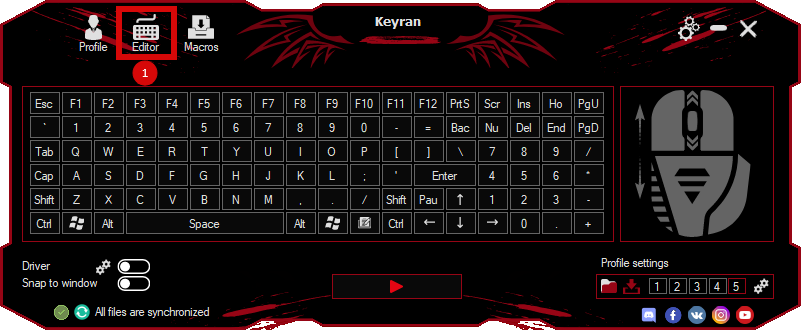
Download and install the Keyran program. Let's go to the macro editor.
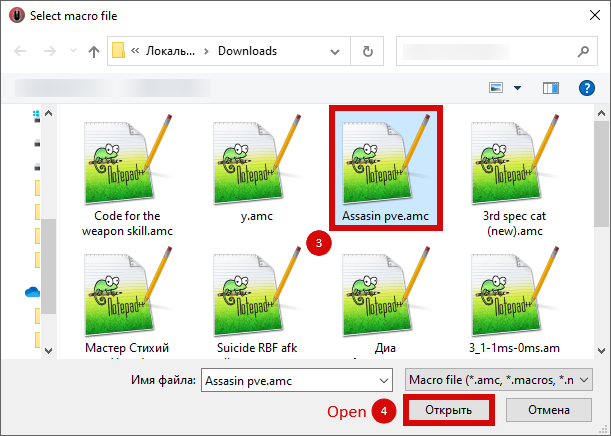
Click the «Open File» button and select the downloaded file.
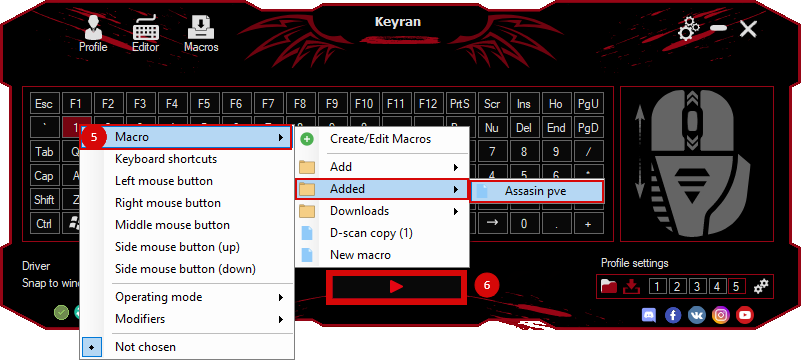
Assign a macro to a key and run the program.
Содержимое сообщения
✕